
Learn how to use legal AI
Learn the app step by step, practise with fictional examples, or find the instructions you need.
Learning progress
Progress stays in this browser, separately from your app account. Exercises are not saved.
Attach a document
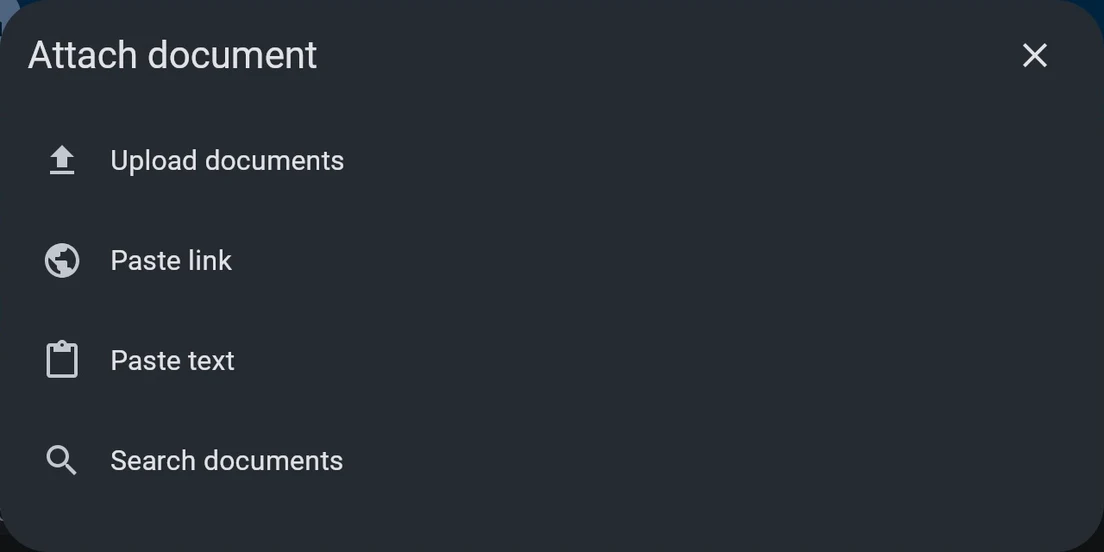
Add a lease, contract, letter or notice as a PDF, Word file or photo. We read it and answer about what it says.
Eight short lessons
Read in any order. No account needed.
- 01 / 08
Ask your first question
Describe your situation in your own words. Answers follow the law set in “Which law applies”.
- 02 / 08
Improve a question
Write your question, then select the sparkle icon to make it clearer. Review and edit the suggested wording before sending.
- 03 / 08
Attach a document
Add a lease, contract, letter or notice as a PDF, Word file or photo. We read it and answer about what it says.
- 04 / 08
Check the answer
Select a citation to see the source and the relevant passage. Open the source, read the surrounding text and check whether it supports the answer.
- 05 / 08
Try Pro or Research
Pro spends more time on complex questions. Research checks more sources and takes longer. Both are included in a paid subscription.
- 06 / 08
Draft a document
Describe the letter or reply you need. We write a draft you can edit, and every change is kept as a version.
- 07 / 08
Save a prompt
Save questions or instructions you use often. Choose one under Prompts to add it to the question box.
- 08 / 08
Download or share
Download a document as a Word file, a PDF or its original format. To share an answer, use the controls below it.
What would you like to do?
19 results
Choose the applicable law
Choose the country and region in Which law applies on Home. Language does not determine jurisdiction; explain any cross-border facts.
Quick actions
Choose Draft, Review, Explain or Summarize to start with the task you need help with.
Attach a document
Add a lease, contract, letter or notice as a PDF, Word file or photo. We read it and answer about what it says.
Check original text
Open the document; use View original where available. Compare pages, tables, dates and amounts with the extracted text.
Check the answer
Select a citation to see the source and the relevant passage. Open the source, read the surrounding text and check whether it supports the answer.
Try Pro or Research
Pro spends more time on complex questions. Research checks more sources and takes longer. Both are included in a paid subscription.
Draft a document
Describe the letter or reply you need. We write a draft you can edit, and every change is kept as a version.
Compare document versions
Use the document’s version controls to compare changes. Check which version is selected before reusing or downloading it. Earlier answers still refer to the text used when they were written.
Save a prompt
Save questions or instructions you use often. Choose one under Prompts to add it to the question box.
Write your custom prompt
Your custom prompt goes with every question, like a note to the AI. Add how you want answers and facts that rarely change: who you are, where you live, who the other side is. Leave out passwords and ID numbers.
Download or share
Download a document as a Word file, a PDF or its original format. To share an answer, use the controls below it.
Find a previous consultation
Open Your consultations to resume work. Use the consultation menu to rename or pin it. Keep unrelated matters separate.
Sign in
Your consultations and documents, together on every device. They stay with your account if you change phones.
I can’t pay on my phone. What should I do?
If you can’t subscribe through the App Store or Google Play, try the browser app. Open app.aireadslaw.com, sign in with the same email address you use in the mobile app, and subscribe there. Then sign in on your phone with that same email address to use your subscription. You can also use AI Reads Law directly in your browser. If you still have trouble, contact us with a screenshot of the error, with any payment details hidden.
Use the app in your browser
Open app.aireadslaw.com; use Install or Add to Home Screen where offered. The extension opens a side panel in compatible browsers; paste text or links yourself. It does not automatically read pages.
Change language or appearance
Change app language and appearance in Settings. This guide has separate controls. Language does not change the applicable law.
Connection or storage trouble
Check your internet connection before sending. You need to be online to open the web app. If you see a message that storage is in use, close other app tabs or extension panels and try again. Avoid clearing browser data as a first step: you could lose unsent work.
Request data deletion
You can request deletion in the app, or contact us directly from the email address registered to your account. We may need to verify your identity before processing your request. Our Privacy Policy explains retention and any legal exceptions.
Mobile-only tools
Scanning, dictation and read-aloud depend on the mobile platform, permissions and version. They are unavailable in this web version. Upload a file or photo and type instead.
Ready to try your own situation?
AI can make mistakes, miss facts or use outdated law. Check sources and deadlines. Get qualified legal help for important decisions.
Based on the published web app 3.29.1, checked 12 October 2026. Mobile controls may differ.